

Buffer
📘 Tool Name: Buffer
🔗 Official Site: https://buffer.com
🎥 Explainer Video: https://www.youtube.com/watch?v=x79OsBO0enU
🧑💻 AIC Contributor: AIC Community
🧩 Quick Look: Schedule, publish, analyze social media posts
Beginner Benefit: Share content easily without stress
🌟 Buffer 101:
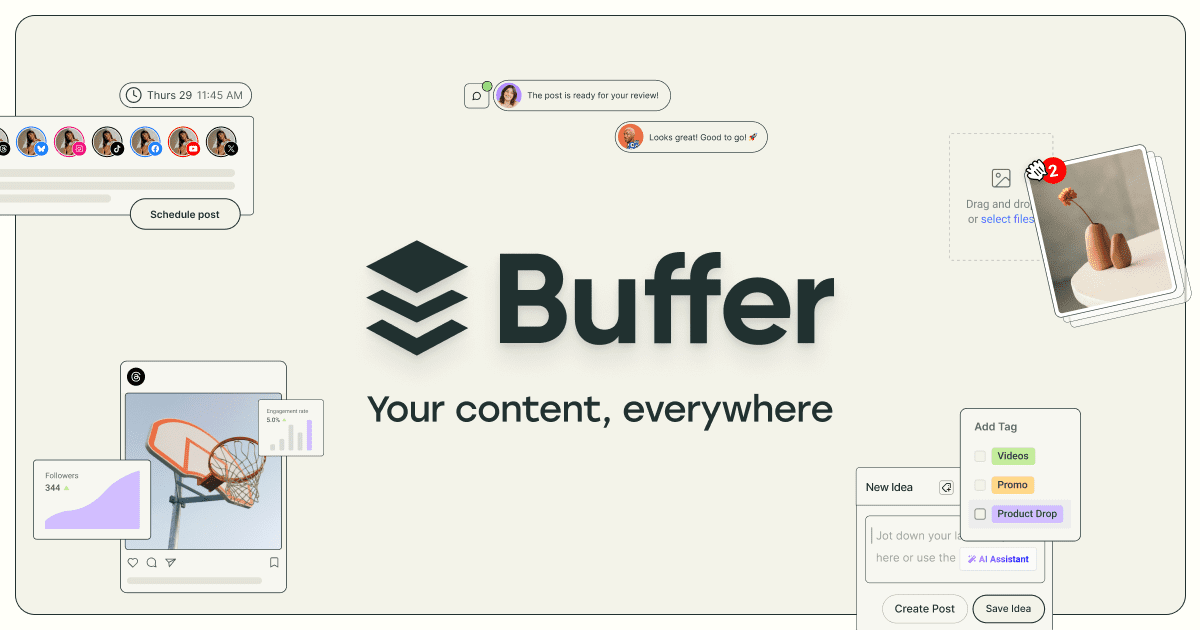
Buffer is like your personal assistant for social media, helping you share your thoughts, photos, and videos across different platforms without the hassle. Instead of posting manually to Facebook, Instagram, and Twitter one by one, you can plan everything in Buffer. It helps you schedule your posts to go out at the perfect times, even when you're busy doing other things.
This tool makes it super easy to keep your online presence active and engaging, whether you're a small business, a content creator, or just someone who loves sharing. You can draft your posts, add images, and then tell Buffer exactly when and where to send them. Plus, it gives you insights into how your posts are performing, so you can learn what your audience likes best.
📚 Key AI Concepts Explained:
1. AI Assistant: This feature helps you brainstorm ideas, rewrite content, and create posts tailored for specific social media platforms.
2. Social Media Automation: The tool lets you pre-plan and schedule your content to be posted automatically at future dates and times.
3. Performance Analytics: Buffer uses data to show you how well your posts are doing, helping you understand audience engagement and reach.
📖 Words to Know:
1. Content Calendar: A visual plan that outlines what and when you will publish content.
2. Engagement Rate: Measures how much interaction your audience has with your social media posts.
3. Cross-Posting: Sharing the same or similar content across multiple different social media platforms.
🎯 Imagine This:
Imagine having a robot intern who handles all your social media posting for you, freeing up your time for creative ideas.
Think of it as setting your favorite playlist to shuffle for the week, but instead, it's your online messages playing out perfectly.
🌟 Fun Fact About the Tool:
1. Buffer has been an "open company" since 2013, publicly sharing its finances, team salaries, and key metrics.
2. The company operates as a fully remote team with employees spread across many different countries and time zones.
3. Buffer was initially designed as a simple tool to help you add articles to a "buffer" and schedule them for later posting.
✅ Pros:
1. Simplifies scheduling posts across many different social media platforms.
2. Offers clear analytics to help understand what content performs best.
3. Includes an AI assistant to help generate and refine social media content.
❌ Cons:
1. The advanced features and detailed analytics might be overwhelming for absolute beginners.
2. Some platform-specific features may not be fully integrated compared to native tools.
3. The free tier might have limited features, pushing users towards paid plans.
🧪 Use Cases:
1. Scheduling all your weekly Instagram posts in one session saves significant time.
2. Monitoring comments and messages from all platforms in a single, organized inbox.
3. Analyzing which blog post links perform best on Facebook versus LinkedIn.
💰 Pricing Breakdown:
Buffer offers a straightforward pricing structure designed to grow with your needs. You can actually get started for free, with no credit card required, as they offer a "Free forever" plan. This free tier allows you to connect a limited number of social accounts and schedule a certain number of posts. For those needing more features, accounts, or team collaboration, Buffer provides paid plans that scale up, offering enhanced analytics, more channels, and unlimited users.
🌟 Real-World Examples:
1. A local baker uses Buffer to schedule mouth-watering photos of daily specials on Instagram and Facebook, attracting more customers to their shop.
2. A student running a study blog sets up Buffer to share helpful articles and tips on Twitter and Pinterest, growing their online community without distraction.
3. A small independent artist uses Buffer to promote their new artworks and upcoming exhibitions across all their social media, reaching a wider audience consistently.
💡 Initial Warnings:
1. Understanding which social platforms work best for your content might take some initial experimentation.
2. While convenient, over-automating posts without genuine interaction can sometimes feel impersonal to your audience.
3. Always double-check your scheduled content for accuracy and tone before it goes live to avoid any mistakes.
🚀 Getting Started:
1. Visit https://buffer.com and click the "Get started now" button to begin your free account.
2. Sign up using your email address, then connect your first social media accounts like Instagram or Facebook.
3. Start drafting your first post and use the scheduling tool to pick a date and time for it to publish.
💡 Power-Ups:
1. Utilize the AI Assistant: For advanced users, leverage the AI to quickly generate variations of content or brainstorm campaign ideas, saving creative time.
2. Deep Dive into Analytics: Beyond basic numbers, analyze specific post types and audience demographics to refine your strategy for maximum impact and growth.
3. Streamline Team Collaboration: Set up approval workflows and assign specific roles to team members, ensuring all content aligns with your brand's voice and goals.
🎯 Difficulty Score: 3/10 😌 (Easy to Learn)
Buffer scores a 3 out of 10 for difficulty, making it quite user-friendly for anyone new to social media management. Its usability is high, thanks to a clean interface and intuitive scheduling features, ensuring a pleasant experience. Beginners will quickly grasp its core functions, benefiting from automated posting without needing advanced technical skills. While setting up multiple accounts initially requires attention, the consistent benefits of time-saving and organized content make it enjoyable and worthwhile.
⭐ Official AI-Driven Rating: 8/10
We're giving Buffer an 8 out of 10. For beginners, it’s an excellent starting point, making social media management far less intimidating. We love its straightforward interface and the invaluable time it saves by centralizing content scheduling. Points are awarded for its robust scheduling across many platforms and its helpful AI assistant for content creation. A point is deducted because the full power of its analytics might require a bit more effort for new users to fully harness, and the free plan is somewhat limited, encouraging an upgrade.
🔎 DEEPER LOOK at Buffer
🎯 Why Buffer is a Game-Changer for Small Business Owners
Are you a small business owner juggling a million tasks and struggling to keep your social media fresh and engaging? Say hello to Buffer, your new best friend in the digital world! Buffer is specifically designed to take the stress out of your social media efforts, making sure your brand shines online without demanding all your precious time.
This fantastic tool helps you work smarter, not just faster, by letting you plan all your posts in advance. Imagine scheduling a week's worth of content in one sitting – your product announcements, behind-the-scenes glimpses, or customer testimonials – and then Buffer handles the rest, posting them automatically to all your connected channels. It solves the headache of remembering to post daily and ensures your online presence is consistent and professional.
Even seasoned marketing pros use Buffer for its efficiency, but it truly empowers beginners to compete effectively online. By freeing you from the daily grind of manual posting, Buffer lets you focus on what you do best: running your business and fueling your creativity.
🔑 Key Features of Buffer: In-Depth Breakdown
Feature 1: Publish & Schedule
This is Buffer's core superpower. The Publish feature allows you to plan and schedule all your social media content across nearly a dozen platforms, including Instagram, Facebook, TikTok, LinkedIn, and X (Twitter). Instead of manually uploading and posting to each one, you draft your content once, set the dates and times, and Buffer ensures it goes live. This saves immense time and ensures a consistent online presence, helping you never miss an important posting opportunity again. For a small business, this means you can pre-plan holiday promotions or weekly updates and focus on serving customers.
Feature 2: Create & AI Assistant
Buffer's Create feature helps you turn any idea into the perfect post. Whether you're working solo or with a team, it provides the tools to organize and repurpose content for various channels. What truly makes it stand out is the integrated AI Assistant. Stuck on what to write? The AI can brainstorm ideas, rewrite existing content to make it more engaging, or even craft platform-specific posts, ensuring your message resonates wherever it's shared. This is invaluable for beginners who might struggle with writing captivating captions or generating fresh ideas consistently.
Feature 3: Community & Analyze
Buffer isn't just about sending out posts; it also helps you understand and engage with your audience. The Community feature centralizes all your comments and messages from supported platforms into one simple dashboard, allowing you to reply in a flash. No more hopping between apps to manage conversations! Coupled with the Analyze feature, which provides easy-to-understand analytics, you get "answers, not just analytics." It helps you learn what content works, which platforms drive the most engagement, and how to improve your strategy over time. For a beginner, this means actionable insights without needing to be a data expert.
🚀 Real-World Case Studies Using Buffer
Don’t just take our word for it. Here are a few real-world examples of how people are using Buffer to do amazing things.
1. The Budding Influencer's Growth: Sarah, a new fashion influencer, used Buffer to schedule all her outfit-of-the-day posts and style tips consistently across Instagram, Pinterest, and TikTok. By planning her content weekly, she maintained a professional presence and grew her followers rapidly without getting overwhelmed by daily posting demands, allowing her to focus more on creating stunning visuals.
2. Non-Profit's Awareness Campaign: A small local animal shelter leveraged Buffer to organize its adoption event promotions and heartwarming rescue stories on Facebook and X (Twitter). The tool helped them ensure a steady stream of updates, reaching a broader audience and leading to increased volunteer sign-ups and successful adoptions, all managed by a single, busy team member.
3. Local Restaurant's Digital Menu: "The Daily Grind," a cozy cafe, started using Buffer to post their daily specials, new menu items, and enticing coffee photos on Instagram and Google Business Profile. This consistent digital presence kept their customers informed and engaged, bringing more foot traffic into the cafe, especially during peak hours, and helping them showcase their culinary delights effortlessly.
❓ Frequently Asked Questions about Buffer
1. What exactly is Buffer and how does it help me with social media?
Buffer is a social media management tool that lets you plan, schedule, and publish your content across multiple social media platforms from one place. It helps you maintain a consistent online presence, saves you time, and provides insights into how your posts are performing.
2. Does Buffer offer a free version or a free trial?
Yes, Buffer offers a "Free forever" plan that doesn't require a credit card to get started. This free tier allows you to connect a limited number of social accounts and schedule a certain number of posts, making it perfect for individuals or very small businesses to try out.
3. Can I use Buffer to engage with my audience, or is it just for scheduling posts?
While Buffer is excellent for scheduling, it also has a "Community" feature that gathers all your comments and messages from connected platforms into one dashboard. This allows you to quickly and easily engage with your audience without constantly switching between different social media apps.
4. How secure is my data and social media accounts with Buffer?
Buffer is trusted by over 100,000 businesses and individuals and prioritizes security. They implement robust measures to protect your data and connected accounts. You should always use strong, unique passwords and enable two-factor authentication for added safety.
5. What social media platforms can I connect to Buffer?
Buffer supports a wide range of popular social media platforms including Facebook, Instagram, TikTok, LinkedIn, X (Twitter), Pinterest, YouTube, Google Business Profile, Threads, Mastodon, and Bluesky, allowing you to manage almost all your online presence in one spot.
⚖️ Stay Safe:
The tools and information on this site are aggregated from community contributions and internet sources. We strongly recommend users independently verify all details, consult original resources for accuracy, and exercise caution. The information, including company profiles, pricing, rules, and structures, is based on current knowledge as of December 2025, and is subject to change at the discretion of the respective entities.
This site is provided "as-is" with no warranties, and no professional, financial, or legal advice is offered or implied. We disclaim all liability for errors, omissions, damages, or losses arising from the use of this information. This platform is intended to showcase tools for informational purposes only and does not endorse or advise on financial investments or decisions. Users must conduct their own due diligence (DYOR), verify the authenticity of tool websites to avoid phishing scams, and secure accounts with strong passwords and two-factor authentication.
AIC is not responsible for the performance, safety, outcomes, or risks associated with any listed tools. Some links on this site may be affiliate links, meaning we may earn a commission if you click and make a purchase, at no additional cost to you. Always research thoroughly, comply with local laws and regulations, and consult qualified financial or legal professionals before taking action to understand potential risks. Nothing herein constitutes professional advice, and all decisions are at the user’s sole discretion. This disclaimer is governed by the laws of St. Petersburg, Florida, USA.
🔗 Official Site: https://buffer.com
🎥 Explainer Video: https://www.youtube.com/watch?v=x79OsBO0enU
🧑💻 AIC Contributor: AIC Community
🧩 Quick Look: Schedule, publish, analyze social media posts
Beginner Benefit: Share content easily without stress
🌟 Buffer 101:
Buffer is like your personal assistant for social media, helping you share your thoughts, photos, and videos across different platforms without the hassle. Instead of posting manually to Facebook, Instagram, and Twitter one by one, you can plan everything in Buffer. It helps you schedule your posts to go out at the perfect times, even when you're busy doing other things.
This tool makes it super easy to keep your online presence active and engaging, whether you're a small business, a content creator, or just someone who loves sharing. You can draft your posts, add images, and then tell Buffer exactly when and where to send them. Plus, it gives you insights into how your posts are performing, so you can learn what your audience likes best.
📚 Key AI Concepts Explained:
1. AI Assistant: This feature helps you brainstorm ideas, rewrite content, and create posts tailored for specific social media platforms.
2. Social Media Automation: The tool lets you pre-plan and schedule your content to be posted automatically at future dates and times.
3. Performance Analytics: Buffer uses data to show you how well your posts are doing, helping you understand audience engagement and reach.
📖 Words to Know:
1. Content Calendar: A visual plan that outlines what and when you will publish content.
2. Engagement Rate: Measures how much interaction your audience has with your social media posts.
3. Cross-Posting: Sharing the same or similar content across multiple different social media platforms.
🎯 Imagine This:
Imagine having a robot intern who handles all your social media posting for you, freeing up your time for creative ideas.
Think of it as setting your favorite playlist to shuffle for the week, but instead, it's your online messages playing out perfectly.
🌟 Fun Fact About the Tool:
1. Buffer has been an "open company" since 2013, publicly sharing its finances, team salaries, and key metrics.
2. The company operates as a fully remote team with employees spread across many different countries and time zones.
3. Buffer was initially designed as a simple tool to help you add articles to a "buffer" and schedule them for later posting.
✅ Pros:
1. Simplifies scheduling posts across many different social media platforms.
2. Offers clear analytics to help understand what content performs best.
3. Includes an AI assistant to help generate and refine social media content.
❌ Cons:
1. The advanced features and detailed analytics might be overwhelming for absolute beginners.
2. Some platform-specific features may not be fully integrated compared to native tools.
3. The free tier might have limited features, pushing users towards paid plans.
🧪 Use Cases:
1. Scheduling all your weekly Instagram posts in one session saves significant time.
2. Monitoring comments and messages from all platforms in a single, organized inbox.
3. Analyzing which blog post links perform best on Facebook versus LinkedIn.
💰 Pricing Breakdown:
Buffer offers a straightforward pricing structure designed to grow with your needs. You can actually get started for free, with no credit card required, as they offer a "Free forever" plan. This free tier allows you to connect a limited number of social accounts and schedule a certain number of posts. For those needing more features, accounts, or team collaboration, Buffer provides paid plans that scale up, offering enhanced analytics, more channels, and unlimited users.
🌟 Real-World Examples:
1. A local baker uses Buffer to schedule mouth-watering photos of daily specials on Instagram and Facebook, attracting more customers to their shop.
2. A student running a study blog sets up Buffer to share helpful articles and tips on Twitter and Pinterest, growing their online community without distraction.
3. A small independent artist uses Buffer to promote their new artworks and upcoming exhibitions across all their social media, reaching a wider audience consistently.
💡 Initial Warnings:
1. Understanding which social platforms work best for your content might take some initial experimentation.
2. While convenient, over-automating posts without genuine interaction can sometimes feel impersonal to your audience.
3. Always double-check your scheduled content for accuracy and tone before it goes live to avoid any mistakes.
🚀 Getting Started:
1. Visit https://buffer.com and click the "Get started now" button to begin your free account.
2. Sign up using your email address, then connect your first social media accounts like Instagram or Facebook.
3. Start drafting your first post and use the scheduling tool to pick a date and time for it to publish.
💡 Power-Ups:
1. Utilize the AI Assistant: For advanced users, leverage the AI to quickly generate variations of content or brainstorm campaign ideas, saving creative time.
2. Deep Dive into Analytics: Beyond basic numbers, analyze specific post types and audience demographics to refine your strategy for maximum impact and growth.
3. Streamline Team Collaboration: Set up approval workflows and assign specific roles to team members, ensuring all content aligns with your brand's voice and goals.
🎯 Difficulty Score: 3/10 😌 (Easy to Learn)
Buffer scores a 3 out of 10 for difficulty, making it quite user-friendly for anyone new to social media management. Its usability is high, thanks to a clean interface and intuitive scheduling features, ensuring a pleasant experience. Beginners will quickly grasp its core functions, benefiting from automated posting without needing advanced technical skills. While setting up multiple accounts initially requires attention, the consistent benefits of time-saving and organized content make it enjoyable and worthwhile.
⭐ Official AI-Driven Rating: 8/10
We're giving Buffer an 8 out of 10. For beginners, it’s an excellent starting point, making social media management far less intimidating. We love its straightforward interface and the invaluable time it saves by centralizing content scheduling. Points are awarded for its robust scheduling across many platforms and its helpful AI assistant for content creation. A point is deducted because the full power of its analytics might require a bit more effort for new users to fully harness, and the free plan is somewhat limited, encouraging an upgrade.
🔎 DEEPER LOOK at Buffer
🎯 Why Buffer is a Game-Changer for Small Business Owners
Are you a small business owner juggling a million tasks and struggling to keep your social media fresh and engaging? Say hello to Buffer, your new best friend in the digital world! Buffer is specifically designed to take the stress out of your social media efforts, making sure your brand shines online without demanding all your precious time.
This fantastic tool helps you work smarter, not just faster, by letting you plan all your posts in advance. Imagine scheduling a week's worth of content in one sitting – your product announcements, behind-the-scenes glimpses, or customer testimonials – and then Buffer handles the rest, posting them automatically to all your connected channels. It solves the headache of remembering to post daily and ensures your online presence is consistent and professional.
Even seasoned marketing pros use Buffer for its efficiency, but it truly empowers beginners to compete effectively online. By freeing you from the daily grind of manual posting, Buffer lets you focus on what you do best: running your business and fueling your creativity.
🔑 Key Features of Buffer: In-Depth Breakdown
Feature 1: Publish & Schedule
This is Buffer's core superpower. The Publish feature allows you to plan and schedule all your social media content across nearly a dozen platforms, including Instagram, Facebook, TikTok, LinkedIn, and X (Twitter). Instead of manually uploading and posting to each one, you draft your content once, set the dates and times, and Buffer ensures it goes live. This saves immense time and ensures a consistent online presence, helping you never miss an important posting opportunity again. For a small business, this means you can pre-plan holiday promotions or weekly updates and focus on serving customers.
Feature 2: Create & AI Assistant
Buffer's Create feature helps you turn any idea into the perfect post. Whether you're working solo or with a team, it provides the tools to organize and repurpose content for various channels. What truly makes it stand out is the integrated AI Assistant. Stuck on what to write? The AI can brainstorm ideas, rewrite existing content to make it more engaging, or even craft platform-specific posts, ensuring your message resonates wherever it's shared. This is invaluable for beginners who might struggle with writing captivating captions or generating fresh ideas consistently.
Feature 3: Community & Analyze
Buffer isn't just about sending out posts; it also helps you understand and engage with your audience. The Community feature centralizes all your comments and messages from supported platforms into one simple dashboard, allowing you to reply in a flash. No more hopping between apps to manage conversations! Coupled with the Analyze feature, which provides easy-to-understand analytics, you get "answers, not just analytics." It helps you learn what content works, which platforms drive the most engagement, and how to improve your strategy over time. For a beginner, this means actionable insights without needing to be a data expert.
🚀 Real-World Case Studies Using Buffer
Don’t just take our word for it. Here are a few real-world examples of how people are using Buffer to do amazing things.
1. The Budding Influencer's Growth: Sarah, a new fashion influencer, used Buffer to schedule all her outfit-of-the-day posts and style tips consistently across Instagram, Pinterest, and TikTok. By planning her content weekly, she maintained a professional presence and grew her followers rapidly without getting overwhelmed by daily posting demands, allowing her to focus more on creating stunning visuals.
2. Non-Profit's Awareness Campaign: A small local animal shelter leveraged Buffer to organize its adoption event promotions and heartwarming rescue stories on Facebook and X (Twitter). The tool helped them ensure a steady stream of updates, reaching a broader audience and leading to increased volunteer sign-ups and successful adoptions, all managed by a single, busy team member.
3. Local Restaurant's Digital Menu: "The Daily Grind," a cozy cafe, started using Buffer to post their daily specials, new menu items, and enticing coffee photos on Instagram and Google Business Profile. This consistent digital presence kept their customers informed and engaged, bringing more foot traffic into the cafe, especially during peak hours, and helping them showcase their culinary delights effortlessly.
❓ Frequently Asked Questions about Buffer
1. What exactly is Buffer and how does it help me with social media?
Buffer is a social media management tool that lets you plan, schedule, and publish your content across multiple social media platforms from one place. It helps you maintain a consistent online presence, saves you time, and provides insights into how your posts are performing.
2. Does Buffer offer a free version or a free trial?
Yes, Buffer offers a "Free forever" plan that doesn't require a credit card to get started. This free tier allows you to connect a limited number of social accounts and schedule a certain number of posts, making it perfect for individuals or very small businesses to try out.
3. Can I use Buffer to engage with my audience, or is it just for scheduling posts?
While Buffer is excellent for scheduling, it also has a "Community" feature that gathers all your comments and messages from connected platforms into one dashboard. This allows you to quickly and easily engage with your audience without constantly switching between different social media apps.
4. How secure is my data and social media accounts with Buffer?
Buffer is trusted by over 100,000 businesses and individuals and prioritizes security. They implement robust measures to protect your data and connected accounts. You should always use strong, unique passwords and enable two-factor authentication for added safety.
5. What social media platforms can I connect to Buffer?
Buffer supports a wide range of popular social media platforms including Facebook, Instagram, TikTok, LinkedIn, X (Twitter), Pinterest, YouTube, Google Business Profile, Threads, Mastodon, and Bluesky, allowing you to manage almost all your online presence in one spot.
⚖️ Stay Safe:
The tools and information on this site are aggregated from community contributions and internet sources. We strongly recommend users independently verify all details, consult original resources for accuracy, and exercise caution. The information, including company profiles, pricing, rules, and structures, is based on current knowledge as of December 2025, and is subject to change at the discretion of the respective entities.
This site is provided "as-is" with no warranties, and no professional, financial, or legal advice is offered or implied. We disclaim all liability for errors, omissions, damages, or losses arising from the use of this information. This platform is intended to showcase tools for informational purposes only and does not endorse or advise on financial investments or decisions. Users must conduct their own due diligence (DYOR), verify the authenticity of tool websites to avoid phishing scams, and secure accounts with strong passwords and two-factor authentication.
AIC is not responsible for the performance, safety, outcomes, or risks associated with any listed tools. Some links on this site may be affiliate links, meaning we may earn a commission if you click and make a purchase, at no additional cost to you. Always research thoroughly, comply with local laws and regulations, and consult qualified financial or legal professionals before taking action to understand potential risks. Nothing herein constitutes professional advice, and all decisions are at the user’s sole discretion. This disclaimer is governed by the laws of St. Petersburg, Florida, USA.


Not Rated Yet