

Planable
📘 Tool Name: Planable
🔗 Official Site: https://planable.io
🎥 Explainer Video: https://www.youtube.com/watch?v=tHl1RSyh9O4
🧑💻 AIC Contributor: AIC Community
🧩 Quick Look: Centralize social media content planning.
Beginner Benefit: Post easily across many platforms.
🌟 Planable 101:
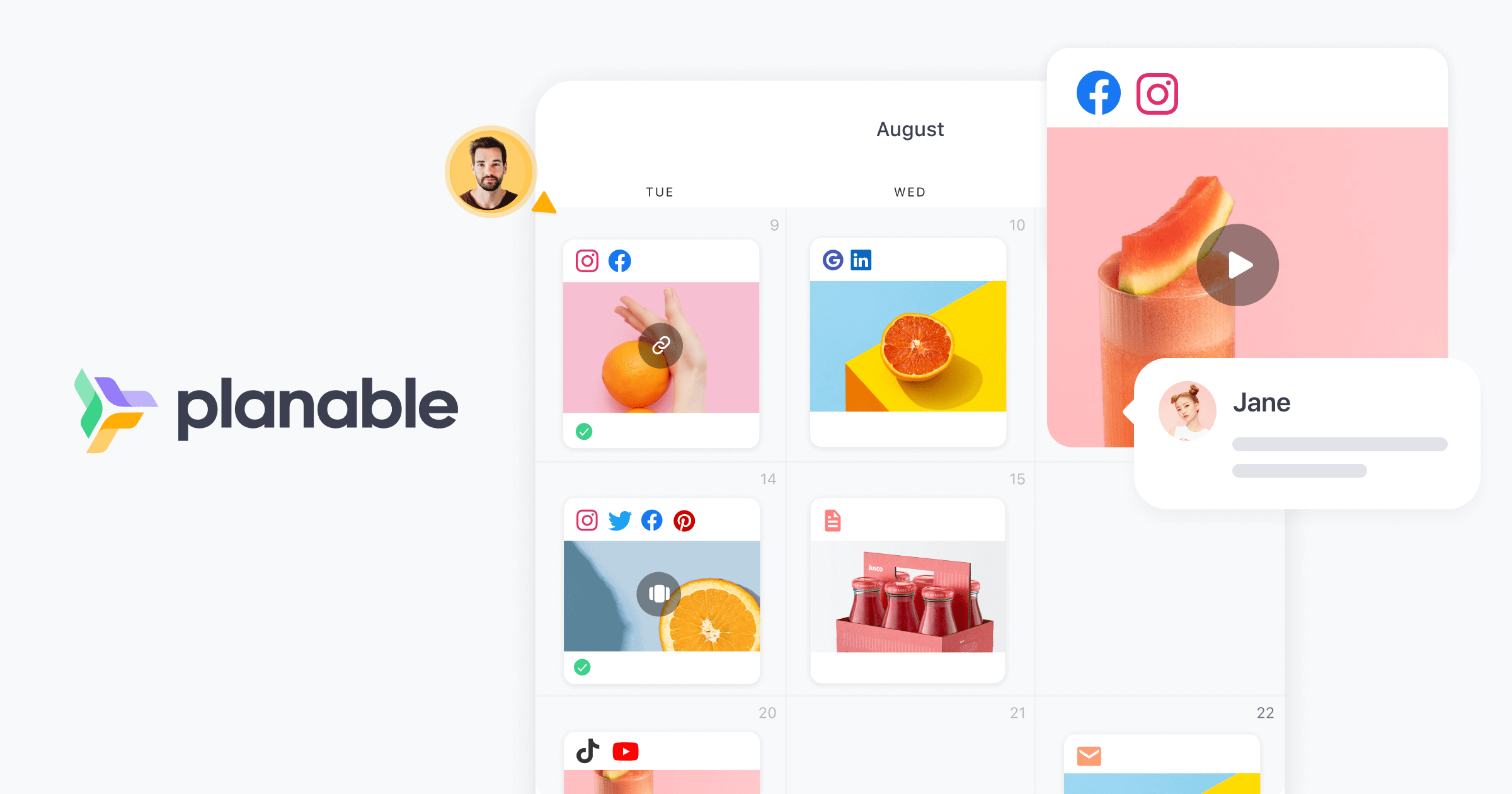
Planable helps you organize all your social media posts in one convenient place. Instead of jumping between Facebook, Instagram, and X, you can see everything laid out visually on a single screen. This makes it super easy to plan exactly what you want to share with your audience and when. It truly feels like having a personal control center for all your online sharing activities.
It's also incredibly useful for working with others, whether that's your own team or your clients. You can share drafts, gather feedback, and get posts approved without endless email chains and confusion. Once everyone agrees the content looks perfect, Planable can even schedule your posts automatically across many different social platforms, saving you valuable time and effort.
📚 Key AI Concepts Explained:
1. AI-Assisted Content Creation: Using smart technology to help you brainstorm ideas, write captions, or even rephrase text for your social media posts quickly.
2. Strategic AI Visibility Insights: Analyzing how your content might perform on different platforms using AI to help you make smarter decisions.
3. Automated Scheduling Optimization: Leveraging AI to suggest the best times to post your content for maximum reach based on audience behavior.
📖 Words to Know:
1. Content Calendar: A visual schedule showing precisely when and where your social media posts will go live.
2. Workflow Management: The structured process detailing how tasks move through a team, from creating content to getting it approved.
3. Post Previews: Seeing exactly how your social media post will look on its native platform before it actually gets published.
🎯 Imagine This:
Imagine Planable as your personal command center for all your social media, like mission control for an astronaut orchestrating a perfect launch.
It’s like having a super organized digital whiteboard where everyone can see, collaborate on, and tweak posts together before they go out.
🌟 Fun Fact About the Tool:
1. Planable lets you preview your Instagram grid layout, so your entire feed always looks perfectly curated and aesthetically appealing.
2. The tool supports scheduling across 9 major social media platforms, handling all their different content formats effortlessly and accurately.
3. Planable was initially designed with marketing agencies in mind, making it exceptionally good at handling multiple brands and client approvals.
✅ Pros:
1. Centralize all social media planning and scheduling efficiently.
2. Streamline team and client collaboration with clear approval flows.
3. Preview posts accurately across various platforms before publishing.
❌ Cons:
1. Requires initial setup to connect all desired social media accounts.
2. May take some time to learn all advanced features and collaboration options.
3. Full feature set might be more robust than single users truly need.
🧪 Use Cases:
1. Small businesses managing their Facebook and Instagram presence daily.
2. Marketing agencies handling social media for multiple different clients.
3. Content creators planning their YouTube, TikTok, and X content schedules.
💰 Pricing Breakdown:
Pricing information was not readily available with specific tiers on the homepage, but Planable offers a free trial so you can test it out. You can also book a demo to learn more about tailored solutions and potentially custom pricing for larger teams or agencies.
🌟 Real-World Examples:
1. A college student running their university club's social media can plan event announcements and photos across Instagram and Facebook easily from one dashboard.
2. A local bakery owner can schedule delicious pictures of daily specials and holiday promotions for their Google Business Profile and Facebook page consistently.
3. A freelance graphic designer can showcase their latest work on LinkedIn and Pinterest, scheduling posts to go out consistently without daily manual effort.
💡 Initial Warnings:
1. Ensure you understand data privacy settings for linked social media accounts before connecting them to any third-party tool.
2. Consider the initial time investment required to set up your workspaces and invite team members, which can take a few minutes.
3. Evaluate if the full feature set aligns with your actual content management needs to avoid paying for tools you might not fully utilize.
🚀 Getting Started:
1. Visit https://planable.io and click the "Try for free" button to create your new account quickly.
2. Connect your desired social media profiles, such as Facebook, Instagram, X, or LinkedIn, to your workspace.
3. Start creating your first post by typing content, adding images, or uploading videos directly into the composer.
4. Invite team members or clients to your workspace for easy collaboration and streamlined feedback processes.
5. Schedule your post to go live at a specific date and time on your chosen platform with a simple click.
💡 Power-Ups:
1. Utilize the AI-powered content generation tools to quickly draft engaging captions or rewrite existing text for different platforms, significantly saving creative time.
2. Set up custom approval workflows for each client or project, ensuring every piece of content gets the right sign-offs before going live, enhancing efficiency and compliance.
3. Leverage the detailed analytics and reporting features to identify top-performing content and optimize your social media strategy for better engagement and audience insights.
🎯 Difficulty Score: 3/10 😎 (Easy to Learn)
Planable scores low on difficulty because its interface is super intuitive and visual, making it easy for anyone new to social media management to pick up quickly. The drag-and-drop features, clear post previews, and consistent design significantly reduce the learning curve, making the initial experience enjoyable. While there are many powerful features available for advanced users, the core functionality is highly accessible, though mastering complex workflows might require a bit more skill. Overall, it provides significant benefits by simplifying otherwise complex tasks.
⭐ Official AI-Driven Rating: 9/10
Planable earns a high rating of 9/10 because it truly excels at simplifying social media management for teams and individuals alike, making it a fantastic choice. I particularly like its visual calendar and robust approval system, which perfectly solves a common pain point in content collaboration, making my work much smoother. Points are heavily awarded for its exceptional ease of use, comprehensive platform support, and the valuable integration of AI tools for content creation. A small deduction for the lack of readily transparent pricing details on the main landing page, which could be clearer for new users comparing different options.
🔎 DEEPER LOOK at Planable
🎯 Why Planable is a Game-Changer for Social Media Managers
Are you tired of juggling multiple social media accounts, enduring endless email chains for approvals, and dealing with scattered content calendars? Planable is here to be your ultimate social media sidekick, especially if you're a social media manager, work for an agency, or manage brands across different locations. It takes the chaos out of content planning and transforms it into a smooth, enjoyable process, so you can focus on creativity, not confusion.
Planable empowers you to bring all your content together in one intuitive space, making you smarter, not just faster, at managing your online presence. Imagine seeing all your Facebook, Instagram, LinkedIn, and TikTok posts neatly laid out on a single calendar, exactly how they'll appear. This visual clarity means less stress, fewer mistakes, and more time to craft genuinely engaging content that resonates with your audience and achieves your goals.
Even seasoned marketing professionals can appreciate Planable's robust features, but its real magic lies in simplifying complex tasks for those new to the game or overwhelmed by multiple clients. It helps you stay organized, get content approved quickly, and publish consistently across channels, leaving you free to brainstorm big ideas and connect meaningfully with your community, fostering true engagement.
🔑 Key Features of Planable: In-Depth Breakdown
Feature 1: Visual Content Calendar
This feature allows you to see all your scheduled social media posts across various platforms in one clean, visual calendar or feed view. Its benefit is immense; you can instantly grasp your entire content strategy, spot any gaps, and ensure a consistent flow of content without having to open each social app individually. What makes it stand out is the "what you see is what you get" preview, showing your post exactly as it will appear on the native platform, making planning incredibly accurate and stress-free.
Feature 2: Real-Time Collaboration & Approval Workflow
Planable makes teamwork a breeze by centralizing all feedback and approvals directly on your posts. You can invite team members and clients to comment, suggest edits, and give a clear "green light" with just one click, ensuring everyone is on the same page. This feature eliminates endless email threads and ensures everyone is aligned, significantly speeding up the approval process and making sure only perfectly polished content goes live.
Feature 3: AI-Powered Content Creation
Gone are the days of staring at a blank screen for inspiration, struggling with writer's block. Planable integrates powerful AI tools directly into its post composer, helping you generate new ideas, rewrite existing text, or even extract copy from images or videos. This powerful feature is incredibly valuable for overcoming creative blocks, quickly tailoring content for different platforms, and ensuring your messages are always engaging and impactful without hours of brainstorming.
🚀 Real-World Case Studies Using Planable
Don’t just take our word for it. Here are a few real-world examples of how people are using Planable to do amazing things.
1. A busy marketing agency was struggling to get client approvals for social media campaigns, leading to delays and missed opportunities. By using Planable's collaborative approval workflow, they reduced approval times by 50%, ensuring campaigns launched on schedule and impressing clients with their efficiency. This allowed them to take on more projects and grow their business significantly.
2. A multi-location restaurant chain found it challenging to maintain consistent branding and promotions across all their social media pages, resulting in a disjointed online presence. Planable allowed their central marketing team to create dedicated workspaces for each restaurant, providing templates and content ideas that local managers could easily customize and schedule, ensuring both brand consistency and local relevance.
3. An independent content creator felt overwhelmed managing their brand across YouTube, Instagram, and a personal blog, often missing posting dates due to manual effort. With Planable's unified content calendar, they could plan all their content, including video release dates and accompanying social media posts, from one intuitive dashboard, ensuring a reliable and stress-free publishing schedule.
❓ Frequently Asked Questions about Planable
1. What exactly is Planable and who is it for?
Planable is a social media management tool designed to help individuals, marketing agencies, and brands plan, collaborate on, and schedule their social media content efficiently. It's perfect for anyone looking to streamline their online presence across multiple platforms and work seamlessly with a team.
2. Does Planable offer a free trial or a free plan?
Yes, Planable offers a free trial so you can explore its features and see how it fits your workflow without any commitment. While explicit pricing tiers aren't prominently displayed on the homepage, the free trial allows you to test the tool before committing to a paid plan.
3. How does Planable help with team collaboration and client approvals?
Planable provides a centralized space where teams and clients can review, comment on, and approve social media posts in real-time directly on the content itself. This eliminates scattered feedback and ensures all content gets a clear green light before it's published, making approvals quick, transparent, and easy.
4. Is my social media account data safe with Planable?
Planable is designed with security in mind, aiming to provide a safe and reliable environment for managing your social media content. They encourage users to employ strong passwords and enable two-factor authentication to further secure their accounts, and the platform focuses on maintaining data integrity.
5. What do I need to get started with Planable?
To get started, you simply need to visit their website, sign up for a free trial using your email, and then connect your various social media accounts (like Facebook, Instagram, or X). You can then immediately begin creating content and inviting your team to collaborate.
⚖️ Stay Safe:
The tools and information on this site are aggregated from community contributions and internet sources. We strongly recommend users independently verify all details, consult original resources for accuracy, and exercise caution. The information, including company profiles, pricing, rules, and structures, is based on current knowledge as of December 2025, and is subject to change at the discretion of the respective entities.
This site is provided "as-is" with no warranties, and no professional, financial, or legal advice is offered or implied. We disclaim all liability for errors, omissions, damages, or losses arising from the use of this information. This platform is intended to showcase tools for informational purposes only and does not endorse or advise on financial investments or decisions. Users must conduct their own due diligence (DYOR), verify the authenticity of tool websites to avoid phishing scams, and secure accounts with strong passwords and two-factor authentication.
AIC is not responsible for the performance, safety, outcomes, or risks associated with any listed tools. Some links on this site may be affiliate links, meaning we may earn a commission if you click and make a purchase, at no additional cost to you. Always research thoroughly, comply with local laws and regulations, and consult qualified financial or legal professionals before taking action to understand potential risks. Nothing herein constitutes professional advice, and all decisions are at the user’s sole discretion. This disclaimer is governed by the laws of St. Petersburg, Florida, USA.
🔗 Official Site: https://planable.io
🎥 Explainer Video: https://www.youtube.com/watch?v=tHl1RSyh9O4
🧑💻 AIC Contributor: AIC Community
🧩 Quick Look: Centralize social media content planning.
Beginner Benefit: Post easily across many platforms.
🌟 Planable 101:
Planable helps you organize all your social media posts in one convenient place. Instead of jumping between Facebook, Instagram, and X, you can see everything laid out visually on a single screen. This makes it super easy to plan exactly what you want to share with your audience and when. It truly feels like having a personal control center for all your online sharing activities.
It's also incredibly useful for working with others, whether that's your own team or your clients. You can share drafts, gather feedback, and get posts approved without endless email chains and confusion. Once everyone agrees the content looks perfect, Planable can even schedule your posts automatically across many different social platforms, saving you valuable time and effort.
📚 Key AI Concepts Explained:
1. AI-Assisted Content Creation: Using smart technology to help you brainstorm ideas, write captions, or even rephrase text for your social media posts quickly.
2. Strategic AI Visibility Insights: Analyzing how your content might perform on different platforms using AI to help you make smarter decisions.
3. Automated Scheduling Optimization: Leveraging AI to suggest the best times to post your content for maximum reach based on audience behavior.
📖 Words to Know:
1. Content Calendar: A visual schedule showing precisely when and where your social media posts will go live.
2. Workflow Management: The structured process detailing how tasks move through a team, from creating content to getting it approved.
3. Post Previews: Seeing exactly how your social media post will look on its native platform before it actually gets published.
🎯 Imagine This:
Imagine Planable as your personal command center for all your social media, like mission control for an astronaut orchestrating a perfect launch.
It’s like having a super organized digital whiteboard where everyone can see, collaborate on, and tweak posts together before they go out.
🌟 Fun Fact About the Tool:
1. Planable lets you preview your Instagram grid layout, so your entire feed always looks perfectly curated and aesthetically appealing.
2. The tool supports scheduling across 9 major social media platforms, handling all their different content formats effortlessly and accurately.
3. Planable was initially designed with marketing agencies in mind, making it exceptionally good at handling multiple brands and client approvals.
✅ Pros:
1. Centralize all social media planning and scheduling efficiently.
2. Streamline team and client collaboration with clear approval flows.
3. Preview posts accurately across various platforms before publishing.
❌ Cons:
1. Requires initial setup to connect all desired social media accounts.
2. May take some time to learn all advanced features and collaboration options.
3. Full feature set might be more robust than single users truly need.
🧪 Use Cases:
1. Small businesses managing their Facebook and Instagram presence daily.
2. Marketing agencies handling social media for multiple different clients.
3. Content creators planning their YouTube, TikTok, and X content schedules.
💰 Pricing Breakdown:
Pricing information was not readily available with specific tiers on the homepage, but Planable offers a free trial so you can test it out. You can also book a demo to learn more about tailored solutions and potentially custom pricing for larger teams or agencies.
🌟 Real-World Examples:
1. A college student running their university club's social media can plan event announcements and photos across Instagram and Facebook easily from one dashboard.
2. A local bakery owner can schedule delicious pictures of daily specials and holiday promotions for their Google Business Profile and Facebook page consistently.
3. A freelance graphic designer can showcase their latest work on LinkedIn and Pinterest, scheduling posts to go out consistently without daily manual effort.
💡 Initial Warnings:
1. Ensure you understand data privacy settings for linked social media accounts before connecting them to any third-party tool.
2. Consider the initial time investment required to set up your workspaces and invite team members, which can take a few minutes.
3. Evaluate if the full feature set aligns with your actual content management needs to avoid paying for tools you might not fully utilize.
🚀 Getting Started:
1. Visit https://planable.io and click the "Try for free" button to create your new account quickly.
2. Connect your desired social media profiles, such as Facebook, Instagram, X, or LinkedIn, to your workspace.
3. Start creating your first post by typing content, adding images, or uploading videos directly into the composer.
4. Invite team members or clients to your workspace for easy collaboration and streamlined feedback processes.
5. Schedule your post to go live at a specific date and time on your chosen platform with a simple click.
💡 Power-Ups:
1. Utilize the AI-powered content generation tools to quickly draft engaging captions or rewrite existing text for different platforms, significantly saving creative time.
2. Set up custom approval workflows for each client or project, ensuring every piece of content gets the right sign-offs before going live, enhancing efficiency and compliance.
3. Leverage the detailed analytics and reporting features to identify top-performing content and optimize your social media strategy for better engagement and audience insights.
🎯 Difficulty Score: 3/10 😎 (Easy to Learn)
Planable scores low on difficulty because its interface is super intuitive and visual, making it easy for anyone new to social media management to pick up quickly. The drag-and-drop features, clear post previews, and consistent design significantly reduce the learning curve, making the initial experience enjoyable. While there are many powerful features available for advanced users, the core functionality is highly accessible, though mastering complex workflows might require a bit more skill. Overall, it provides significant benefits by simplifying otherwise complex tasks.
⭐ Official AI-Driven Rating: 9/10
Planable earns a high rating of 9/10 because it truly excels at simplifying social media management for teams and individuals alike, making it a fantastic choice. I particularly like its visual calendar and robust approval system, which perfectly solves a common pain point in content collaboration, making my work much smoother. Points are heavily awarded for its exceptional ease of use, comprehensive platform support, and the valuable integration of AI tools for content creation. A small deduction for the lack of readily transparent pricing details on the main landing page, which could be clearer for new users comparing different options.
🔎 DEEPER LOOK at Planable
🎯 Why Planable is a Game-Changer for Social Media Managers
Are you tired of juggling multiple social media accounts, enduring endless email chains for approvals, and dealing with scattered content calendars? Planable is here to be your ultimate social media sidekick, especially if you're a social media manager, work for an agency, or manage brands across different locations. It takes the chaos out of content planning and transforms it into a smooth, enjoyable process, so you can focus on creativity, not confusion.
Planable empowers you to bring all your content together in one intuitive space, making you smarter, not just faster, at managing your online presence. Imagine seeing all your Facebook, Instagram, LinkedIn, and TikTok posts neatly laid out on a single calendar, exactly how they'll appear. This visual clarity means less stress, fewer mistakes, and more time to craft genuinely engaging content that resonates with your audience and achieves your goals.
Even seasoned marketing professionals can appreciate Planable's robust features, but its real magic lies in simplifying complex tasks for those new to the game or overwhelmed by multiple clients. It helps you stay organized, get content approved quickly, and publish consistently across channels, leaving you free to brainstorm big ideas and connect meaningfully with your community, fostering true engagement.
🔑 Key Features of Planable: In-Depth Breakdown
Feature 1: Visual Content Calendar
This feature allows you to see all your scheduled social media posts across various platforms in one clean, visual calendar or feed view. Its benefit is immense; you can instantly grasp your entire content strategy, spot any gaps, and ensure a consistent flow of content without having to open each social app individually. What makes it stand out is the "what you see is what you get" preview, showing your post exactly as it will appear on the native platform, making planning incredibly accurate and stress-free.
Feature 2: Real-Time Collaboration & Approval Workflow
Planable makes teamwork a breeze by centralizing all feedback and approvals directly on your posts. You can invite team members and clients to comment, suggest edits, and give a clear "green light" with just one click, ensuring everyone is on the same page. This feature eliminates endless email threads and ensures everyone is aligned, significantly speeding up the approval process and making sure only perfectly polished content goes live.
Feature 3: AI-Powered Content Creation
Gone are the days of staring at a blank screen for inspiration, struggling with writer's block. Planable integrates powerful AI tools directly into its post composer, helping you generate new ideas, rewrite existing text, or even extract copy from images or videos. This powerful feature is incredibly valuable for overcoming creative blocks, quickly tailoring content for different platforms, and ensuring your messages are always engaging and impactful without hours of brainstorming.
🚀 Real-World Case Studies Using Planable
Don’t just take our word for it. Here are a few real-world examples of how people are using Planable to do amazing things.
1. A busy marketing agency was struggling to get client approvals for social media campaigns, leading to delays and missed opportunities. By using Planable's collaborative approval workflow, they reduced approval times by 50%, ensuring campaigns launched on schedule and impressing clients with their efficiency. This allowed them to take on more projects and grow their business significantly.
2. A multi-location restaurant chain found it challenging to maintain consistent branding and promotions across all their social media pages, resulting in a disjointed online presence. Planable allowed their central marketing team to create dedicated workspaces for each restaurant, providing templates and content ideas that local managers could easily customize and schedule, ensuring both brand consistency and local relevance.
3. An independent content creator felt overwhelmed managing their brand across YouTube, Instagram, and a personal blog, often missing posting dates due to manual effort. With Planable's unified content calendar, they could plan all their content, including video release dates and accompanying social media posts, from one intuitive dashboard, ensuring a reliable and stress-free publishing schedule.
❓ Frequently Asked Questions about Planable
1. What exactly is Planable and who is it for?
Planable is a social media management tool designed to help individuals, marketing agencies, and brands plan, collaborate on, and schedule their social media content efficiently. It's perfect for anyone looking to streamline their online presence across multiple platforms and work seamlessly with a team.
2. Does Planable offer a free trial or a free plan?
Yes, Planable offers a free trial so you can explore its features and see how it fits your workflow without any commitment. While explicit pricing tiers aren't prominently displayed on the homepage, the free trial allows you to test the tool before committing to a paid plan.
3. How does Planable help with team collaboration and client approvals?
Planable provides a centralized space where teams and clients can review, comment on, and approve social media posts in real-time directly on the content itself. This eliminates scattered feedback and ensures all content gets a clear green light before it's published, making approvals quick, transparent, and easy.
4. Is my social media account data safe with Planable?
Planable is designed with security in mind, aiming to provide a safe and reliable environment for managing your social media content. They encourage users to employ strong passwords and enable two-factor authentication to further secure their accounts, and the platform focuses on maintaining data integrity.
5. What do I need to get started with Planable?
To get started, you simply need to visit their website, sign up for a free trial using your email, and then connect your various social media accounts (like Facebook, Instagram, or X). You can then immediately begin creating content and inviting your team to collaborate.
⚖️ Stay Safe:
The tools and information on this site are aggregated from community contributions and internet sources. We strongly recommend users independently verify all details, consult original resources for accuracy, and exercise caution. The information, including company profiles, pricing, rules, and structures, is based on current knowledge as of December 2025, and is subject to change at the discretion of the respective entities.
This site is provided "as-is" with no warranties, and no professional, financial, or legal advice is offered or implied. We disclaim all liability for errors, omissions, damages, or losses arising from the use of this information. This platform is intended to showcase tools for informational purposes only and does not endorse or advise on financial investments or decisions. Users must conduct their own due diligence (DYOR), verify the authenticity of tool websites to avoid phishing scams, and secure accounts with strong passwords and two-factor authentication.
AIC is not responsible for the performance, safety, outcomes, or risks associated with any listed tools. Some links on this site may be affiliate links, meaning we may earn a commission if you click and make a purchase, at no additional cost to you. Always research thoroughly, comply with local laws and regulations, and consult qualified financial or legal professionals before taking action to understand potential risks. Nothing herein constitutes professional advice, and all decisions are at the user’s sole discretion. This disclaimer is governed by the laws of St. Petersburg, Florida, USA.

Not Rated Yet