

Softr
📘 Tool Name: Softr
🔗 Official Site: https://www.softr.io
🎥 Explainer Video: https://www.youtube.com/watch?v=NRVFXiVIBHE
🧑💻 AIC Contributor: AIC Community
🧩 Quick Look: Build custom apps without any code.
Beginner Benefit: Create apps easily, no tech skills.
🌟 Softr 101:
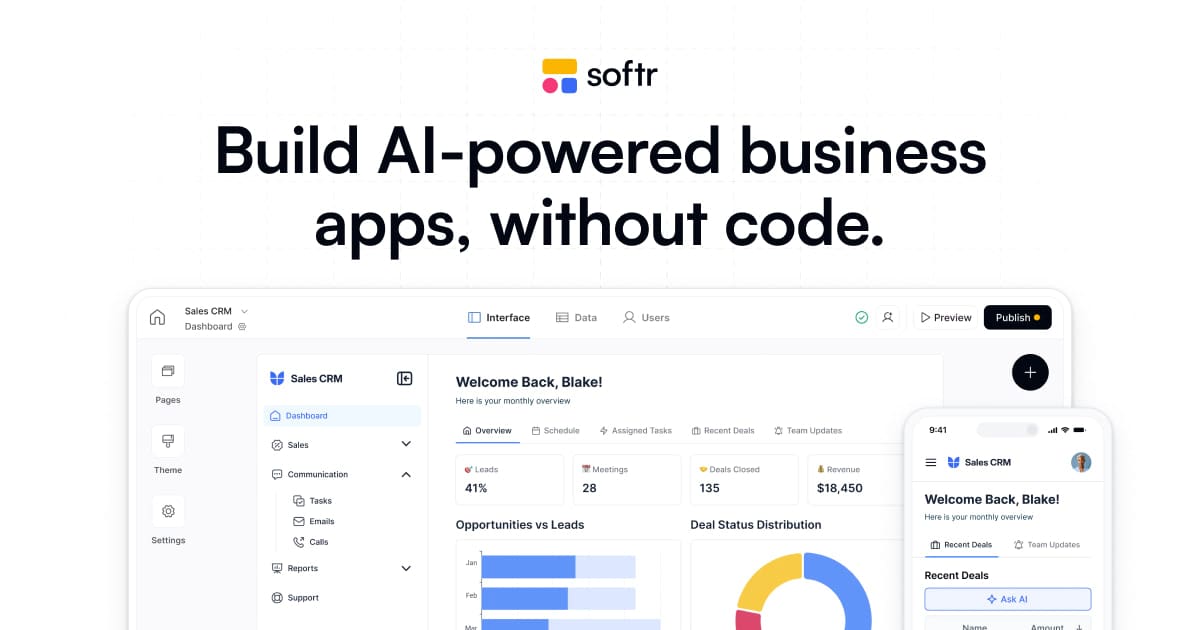
Softr is a fantastic tool that lets anyone build custom websites and applications without writing a single line of code. Imagine needing a special portal for your customers or an internal tool for your team to manage projects; Softr makes it possible with simple drag-and-drop actions.
You can connect it to your existing data, like spreadsheets or databases, and turn that information into powerful, interactive apps. It's designed to be incredibly user-friendly, allowing you to bring your ideas to life quickly and efficiently, even if you're new to tech.
📚 Key AI Concepts Explained:
1. Ask AI Assistant: This feature allows you to embed an AI chatbot directly into your app, letting users ask questions and get instant answers based on your app's real-time data.
2. AI Agents: Softr uses AI agents to help populate and update fields within your database, automating data entry and enrichment processes for smoother operations.
3. AI Co-builder: This intelligent assistant helps you build your applications faster by suggesting layouts, features, and assisting with the design process.
📖 Words to Know:
1. No-code: Building software or websites using visual tools instead of traditional programming languages.
2. Building Blocks: Pre-designed components or sections you can drag and drop to construct your app.
3. Data Sources: Where your app gets its information, like a Google Sheet or an Airtable database.
🎯 Imagine This:
It's like having a set of digital LEGOs to build your own custom online tools, piece by piece.
Think of it as creating a personalized online storefront without needing to hire a professional builder.
🌟 Fun Fact About the Tool:
1. Softr is trusted by over 800,000 teams globally, showing just how widely adopted no-code solutions have become.
2. It can turn your web application into a mobile app with just a button click, extending your reach instantly.
3. Softr helps businesses stop overspending on complex software by letting them build exactly what they need.
✅ Pros:
1. Build powerful custom apps and portals without any coding knowledge.
2. Integrates with popular data sources like Airtable and Google Sheets.
3. Automate workflows and add AI features to your applications easily.
❌ Cons:
1. May require some learning to master all the advanced features and integrations.
2. Customization options might be limited compared to traditional coded apps.
3. Performance can sometimes depend on the connected data sources' efficiency.
🧪 Use Cases:
1. Building a client portal for sharing documents and project updates securely.
2. Creating an internal dashboard to track team performance and inventory.
3. Developing a custom CRM to manage customer information and sales leads.
💰 Pricing Breakdown:
Softr offers a "Get started free" option, indicating a free tier is available for users to explore the platform. While specific detailed pricing plans (like starter, professional, business tiers) were not immediately available on the homepage, the presence of a free starting point is excellent for beginners. Users can likely scale up to paid plans for more features, users, or advanced integrations.
🌟 Real-World Examples:
1. A student could build a personal project management dashboard to organize assignments and deadlines, making study life much smoother.
2. A small business owner might create a simple online catalog for their products or a booking system for appointments without hiring a developer.
3. A content creator can design a member-only portal to share exclusive content or resources with their audience, boosting community engagement.
💡 Initial Warnings:
1. Understand your data structure beforehand; organizing your information makes app building much smoother and more efficient.
2. Start with a clear goal in mind; planning your app's purpose helps avoid unnecessary features and complexities.
3. While powerful, Softr is a no-code tool, so managing expectations for highly unique or complex functions is wise.
🚀 Getting Started:
1. Visit the official Softr website at https://www.softr.io to begin your journey.
2. Click on the "Get started free" button to sign up with your email or Google account.
3. Explore the available templates and choose one that closely matches your app idea.
4. Connect your existing data sources, like a Google Sheet, to power your new application.
5. Drag and drop "Building Blocks" to customize the layout and add your unique features.
6. Publish your custom app and share it with your audience in minutes.
💡 Power-Ups:
1. Explore Softr Workflows: Automate multi-step processes across your apps and connected tools using visual builders for increased efficiency.
2. Leverage Database AI Agents: Use AI to automatically populate and update fields in your database, reducing manual data entry for complex tasks.
3. Integrate with Zapier or Make: Connect Softr with over 30 other apps to create advanced automations and streamline your entire business operation.
🎯 Difficulty Score: 3/10 🤩 (Accessible)
Softr is impressively easy for beginners, making it highly accessible to anyone without coding experience. The drag-and-drop interface significantly boosts usability, and the immediate visual feedback makes building enjoyable. While understanding how to structure your data might take a moment, the benefits of quickly creating functional apps outweigh this minor learning curve. It truly empowers non-technical users to build robust solutions.
⭐ Official AI-Driven Rating: 8/10
Softr earns a high rating for its exceptional ability to empower non-technical users to build powerful applications. I particularly love its seamless integration with common data sources and the built-in AI features that genuinely simplify development. Points are awarded for its intuitive interface, robust features for building custom portals and tools, and the efficiency it brings to automating business operations. A slight deduction is made only because advanced custom styling or very niche functionalities might still require workarounds or more specific knowledge, though this is a minor point for its target audience.
🔎 DEEPER LOOK at Softr
🎯 Why Softr is a Game-Changer for Small Business Owners
Are you a small business owner tired of juggling multiple spreadsheets and expensive, clunky software that barely fits your needs? Softr is here to change the game for you! Imagine effortlessly building a custom client portal, an internal team dashboard, or even an inventory management system without ever touching a line of code.
Softr empowers you to take control of your digital tools, transforming scattered data and manual processes into streamlined, intelligent applications. Instead of overpaying for software packed with features you'll never use, Softr lets you create exactly what you need, tailored to your unique workflows. It’s about working smarter, not just faster, by automating tasks and connecting your data in one central, easy-to-manage place.
Even seasoned professionals can benefit from Softr's speed and flexibility, but its true magic lies in empowering beginners. It democratizes app development, allowing you to focus on your business and creativity, rather than getting bogged down in complex coding or costly development cycles. Unleash your ideas and build the tools that truly serve your business!
🔑 Key Features of Softr: In-Depth Breakdown
Feature 1: Intuitive Interface Builder
This feature allows you to visually design your app's appearance by simply dragging and dropping pre-built "blocks" onto your canvas. You don't need design skills or coding knowledge; just pick the elements you want, like text boxes, images, lists, or forms, and arrange them. This makes creating stunning, professional-looking user interfaces incredibly quick and easy, ensuring your app looks great on any device.
Feature 2: Seamless Data Source Integration
Softr excels at connecting to where your data already lives, whether it's in a Google Sheet, Airtable, or a SQL database. This means you don't have to move all your information; Softr builds dynamic apps *on top* of your existing data, keeping everything in sync. It's incredibly valuable because your app's content updates in real-time as your connected data changes, making it powerful for dashboards or client portals.
Feature 3: Built-in AI Capabilities (Ask AI & AI Agents)
Softr integrates practical AI directly into your applications. "Ask AI" lets you add a chatbot that answers user questions based on your app's data, respecting user permissions. "AI Agents" can automate tasks like populating and updating database fields, making data management much more efficient. These AI tools help you create more intelligent and interactive apps without needing an AI expert.
🚀 Real-World Case Studies Using Softr
Don’t just take our word for it. Here are a few real-world examples of how people are using Softr to do amazing things.
1. A small photography studio used Softr to build a secure client gallery portal. They could upload client photos, allow clients to select favorites, and track order statuses, all in one custom platform. This saved them hours of email communication and kept clients happy with easy access to their images.
2. An online tutoring service created an employee directory and resource hub for their tutors using Softr. Tutors could quickly find contact information, access training materials, and share best practices, making onboarding new staff and managing the team much more efficient.
3. A local community garden designed an inventory management system with Softr to track their plants, tools, and supplies. Volunteers could update stock levels, request new items, and view plant health records, ensuring the garden ran smoothly without complex spreadsheets.
❓ Frequently Asked Questions about Softr
1. What exactly is Softr and what can it do for me?
Softr is a no-code platform that lets you build custom web applications like client portals, internal tools, and dashboards by dragging and dropping elements. It helps you turn your data into functional apps without needing any programming skills.
2. Is there a free version or trial available for Softr?
Yes, Softr offers a "Get started free" option, allowing new users to sign up and begin building their applications without any upfront cost. This is a great way to explore its features and see if it fits your needs.
3. How does Softr handle my existing data?
Softr integrates seamlessly with various existing data sources like Google Sheets, Airtable, and even SQL databases. It builds your apps on top of this data, keeping everything synchronized in real-time without requiring you to migrate your information.
4. Is Softr secure for business-critical applications?
Yes, Softr emphasizes security and reliability. It is SOC 2 (Type II) compliant and supports secure login options like SSO (SAML, OpenID), ensuring that your applications and user data are protected.
5. What do I need to get started with Softr?
You primarily need an idea for an app and potentially some existing data you'd like to use. Just visit their website, sign up for a free account, and you can begin building with their templates and intuitive interface.
⚖️ Stay Safe:
The tools and information on this site are aggregated from community contributions and internet sources. We strongly recommend users independently verify all details, consult original resources for accuracy, and exercise caution. The information, including company profiles, pricing, rules, and structures, is based on current knowledge as of December 2025, and is subject to change at the discretion of the respective entities.
This site is provided "as-is" with no warranties, and no professional, financial, or legal advice is offered or implied. We disclaim all liability for errors, omissions, damages, or losses arising from the use of this information. This platform is intended to showcase tools for informational purposes only and does not endorse or advise on financial investments or decisions. Users must conduct their own due diligence (DYOR), verify the authenticity of tool websites to avoid phishing scams, and secure accounts with strong passwords and two-factor authentication.
AIC is not responsible for the performance, safety, outcomes, or risks associated with any listed tools. Some links on this site may be affiliate links, meaning we may earn a commission if you click and make a purchase, at no additional cost to you. Always research thoroughly, comply with local laws and regulations, and consult qualified financial or legal professionals before taking action to understand potential risks. Nothing herein constitutes professional advice, and all decisions are at the user’s sole discretion. This disclaimer is governed by the laws of St. Petersburg, Florida, USA.
🔗 Official Site: https://www.softr.io
🎥 Explainer Video: https://www.youtube.com/watch?v=NRVFXiVIBHE
🧑💻 AIC Contributor: AIC Community
🧩 Quick Look: Build custom apps without any code.
Beginner Benefit: Create apps easily, no tech skills.
🌟 Softr 101:
Softr is a fantastic tool that lets anyone build custom websites and applications without writing a single line of code. Imagine needing a special portal for your customers or an internal tool for your team to manage projects; Softr makes it possible with simple drag-and-drop actions.
You can connect it to your existing data, like spreadsheets or databases, and turn that information into powerful, interactive apps. It's designed to be incredibly user-friendly, allowing you to bring your ideas to life quickly and efficiently, even if you're new to tech.
📚 Key AI Concepts Explained:
1. Ask AI Assistant: This feature allows you to embed an AI chatbot directly into your app, letting users ask questions and get instant answers based on your app's real-time data.
2. AI Agents: Softr uses AI agents to help populate and update fields within your database, automating data entry and enrichment processes for smoother operations.
3. AI Co-builder: This intelligent assistant helps you build your applications faster by suggesting layouts, features, and assisting with the design process.
📖 Words to Know:
1. No-code: Building software or websites using visual tools instead of traditional programming languages.
2. Building Blocks: Pre-designed components or sections you can drag and drop to construct your app.
3. Data Sources: Where your app gets its information, like a Google Sheet or an Airtable database.
🎯 Imagine This:
It's like having a set of digital LEGOs to build your own custom online tools, piece by piece.
Think of it as creating a personalized online storefront without needing to hire a professional builder.
🌟 Fun Fact About the Tool:
1. Softr is trusted by over 800,000 teams globally, showing just how widely adopted no-code solutions have become.
2. It can turn your web application into a mobile app with just a button click, extending your reach instantly.
3. Softr helps businesses stop overspending on complex software by letting them build exactly what they need.
✅ Pros:
1. Build powerful custom apps and portals without any coding knowledge.
2. Integrates with popular data sources like Airtable and Google Sheets.
3. Automate workflows and add AI features to your applications easily.
❌ Cons:
1. May require some learning to master all the advanced features and integrations.
2. Customization options might be limited compared to traditional coded apps.
3. Performance can sometimes depend on the connected data sources' efficiency.
🧪 Use Cases:
1. Building a client portal for sharing documents and project updates securely.
2. Creating an internal dashboard to track team performance and inventory.
3. Developing a custom CRM to manage customer information and sales leads.
💰 Pricing Breakdown:
Softr offers a "Get started free" option, indicating a free tier is available for users to explore the platform. While specific detailed pricing plans (like starter, professional, business tiers) were not immediately available on the homepage, the presence of a free starting point is excellent for beginners. Users can likely scale up to paid plans for more features, users, or advanced integrations.
🌟 Real-World Examples:
1. A student could build a personal project management dashboard to organize assignments and deadlines, making study life much smoother.
2. A small business owner might create a simple online catalog for their products or a booking system for appointments without hiring a developer.
3. A content creator can design a member-only portal to share exclusive content or resources with their audience, boosting community engagement.
💡 Initial Warnings:
1. Understand your data structure beforehand; organizing your information makes app building much smoother and more efficient.
2. Start with a clear goal in mind; planning your app's purpose helps avoid unnecessary features and complexities.
3. While powerful, Softr is a no-code tool, so managing expectations for highly unique or complex functions is wise.
🚀 Getting Started:
1. Visit the official Softr website at https://www.softr.io to begin your journey.
2. Click on the "Get started free" button to sign up with your email or Google account.
3. Explore the available templates and choose one that closely matches your app idea.
4. Connect your existing data sources, like a Google Sheet, to power your new application.
5. Drag and drop "Building Blocks" to customize the layout and add your unique features.
6. Publish your custom app and share it with your audience in minutes.
💡 Power-Ups:
1. Explore Softr Workflows: Automate multi-step processes across your apps and connected tools using visual builders for increased efficiency.
2. Leverage Database AI Agents: Use AI to automatically populate and update fields in your database, reducing manual data entry for complex tasks.
3. Integrate with Zapier or Make: Connect Softr with over 30 other apps to create advanced automations and streamline your entire business operation.
🎯 Difficulty Score: 3/10 🤩 (Accessible)
Softr is impressively easy for beginners, making it highly accessible to anyone without coding experience. The drag-and-drop interface significantly boosts usability, and the immediate visual feedback makes building enjoyable. While understanding how to structure your data might take a moment, the benefits of quickly creating functional apps outweigh this minor learning curve. It truly empowers non-technical users to build robust solutions.
⭐ Official AI-Driven Rating: 8/10
Softr earns a high rating for its exceptional ability to empower non-technical users to build powerful applications. I particularly love its seamless integration with common data sources and the built-in AI features that genuinely simplify development. Points are awarded for its intuitive interface, robust features for building custom portals and tools, and the efficiency it brings to automating business operations. A slight deduction is made only because advanced custom styling or very niche functionalities might still require workarounds or more specific knowledge, though this is a minor point for its target audience.
🔎 DEEPER LOOK at Softr
🎯 Why Softr is a Game-Changer for Small Business Owners
Are you a small business owner tired of juggling multiple spreadsheets and expensive, clunky software that barely fits your needs? Softr is here to change the game for you! Imagine effortlessly building a custom client portal, an internal team dashboard, or even an inventory management system without ever touching a line of code.
Softr empowers you to take control of your digital tools, transforming scattered data and manual processes into streamlined, intelligent applications. Instead of overpaying for software packed with features you'll never use, Softr lets you create exactly what you need, tailored to your unique workflows. It’s about working smarter, not just faster, by automating tasks and connecting your data in one central, easy-to-manage place.
Even seasoned professionals can benefit from Softr's speed and flexibility, but its true magic lies in empowering beginners. It democratizes app development, allowing you to focus on your business and creativity, rather than getting bogged down in complex coding or costly development cycles. Unleash your ideas and build the tools that truly serve your business!
🔑 Key Features of Softr: In-Depth Breakdown
Feature 1: Intuitive Interface Builder
This feature allows you to visually design your app's appearance by simply dragging and dropping pre-built "blocks" onto your canvas. You don't need design skills or coding knowledge; just pick the elements you want, like text boxes, images, lists, or forms, and arrange them. This makes creating stunning, professional-looking user interfaces incredibly quick and easy, ensuring your app looks great on any device.
Feature 2: Seamless Data Source Integration
Softr excels at connecting to where your data already lives, whether it's in a Google Sheet, Airtable, or a SQL database. This means you don't have to move all your information; Softr builds dynamic apps *on top* of your existing data, keeping everything in sync. It's incredibly valuable because your app's content updates in real-time as your connected data changes, making it powerful for dashboards or client portals.
Feature 3: Built-in AI Capabilities (Ask AI & AI Agents)
Softr integrates practical AI directly into your applications. "Ask AI" lets you add a chatbot that answers user questions based on your app's data, respecting user permissions. "AI Agents" can automate tasks like populating and updating database fields, making data management much more efficient. These AI tools help you create more intelligent and interactive apps without needing an AI expert.
🚀 Real-World Case Studies Using Softr
Don’t just take our word for it. Here are a few real-world examples of how people are using Softr to do amazing things.
1. A small photography studio used Softr to build a secure client gallery portal. They could upload client photos, allow clients to select favorites, and track order statuses, all in one custom platform. This saved them hours of email communication and kept clients happy with easy access to their images.
2. An online tutoring service created an employee directory and resource hub for their tutors using Softr. Tutors could quickly find contact information, access training materials, and share best practices, making onboarding new staff and managing the team much more efficient.
3. A local community garden designed an inventory management system with Softr to track their plants, tools, and supplies. Volunteers could update stock levels, request new items, and view plant health records, ensuring the garden ran smoothly without complex spreadsheets.
❓ Frequently Asked Questions about Softr
1. What exactly is Softr and what can it do for me?
Softr is a no-code platform that lets you build custom web applications like client portals, internal tools, and dashboards by dragging and dropping elements. It helps you turn your data into functional apps without needing any programming skills.
2. Is there a free version or trial available for Softr?
Yes, Softr offers a "Get started free" option, allowing new users to sign up and begin building their applications without any upfront cost. This is a great way to explore its features and see if it fits your needs.
3. How does Softr handle my existing data?
Softr integrates seamlessly with various existing data sources like Google Sheets, Airtable, and even SQL databases. It builds your apps on top of this data, keeping everything synchronized in real-time without requiring you to migrate your information.
4. Is Softr secure for business-critical applications?
Yes, Softr emphasizes security and reliability. It is SOC 2 (Type II) compliant and supports secure login options like SSO (SAML, OpenID), ensuring that your applications and user data are protected.
5. What do I need to get started with Softr?
You primarily need an idea for an app and potentially some existing data you'd like to use. Just visit their website, sign up for a free account, and you can begin building with their templates and intuitive interface.
⚖️ Stay Safe:
The tools and information on this site are aggregated from community contributions and internet sources. We strongly recommend users independently verify all details, consult original resources for accuracy, and exercise caution. The information, including company profiles, pricing, rules, and structures, is based on current knowledge as of December 2025, and is subject to change at the discretion of the respective entities.
This site is provided "as-is" with no warranties, and no professional, financial, or legal advice is offered or implied. We disclaim all liability for errors, omissions, damages, or losses arising from the use of this information. This platform is intended to showcase tools for informational purposes only and does not endorse or advise on financial investments or decisions. Users must conduct their own due diligence (DYOR), verify the authenticity of tool websites to avoid phishing scams, and secure accounts with strong passwords and two-factor authentication.
AIC is not responsible for the performance, safety, outcomes, or risks associated with any listed tools. Some links on this site may be affiliate links, meaning we may earn a commission if you click and make a purchase, at no additional cost to you. Always research thoroughly, comply with local laws and regulations, and consult qualified financial or legal professionals before taking action to understand potential risks. Nothing herein constitutes professional advice, and all decisions are at the user’s sole discretion. This disclaimer is governed by the laws of St. Petersburg, Florida, USA.

Not Rated Yet